How Do I Contact iFax Support?

Quick Answer: For support or general inquiries, please use our Contact Us page. Our dedicated iFax support team will try their best to respond within one business day. For sales-related inquiries, you may contact our sales team directly.

If you’re already signed in, you can also contact support from inside your account using the Live Support button. If you’re on the Enterprise plan, you can reach iFax by 24/7 live chat or phone at any hour.

How to Contact iFax Support: Email, Phone, Live Chat

From inside your account (existing users)

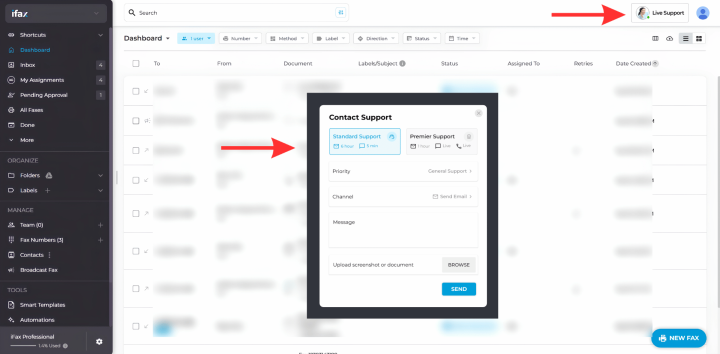
The quickest route is the Live Support button at the top right of your iFax dashboard.

It opens a Contact Support window with these steps:

  1. Choose Standard Support or Premier Support. Standard shows email and live chat. Premier adds live phone.
  2. Select a Priority. The default is General Support.
  3. Select a Channel, such as Send Email.
  4. Type your Message.
  5. (Optional Step) Click Browse to attach a screenshot or document, then Send.

Attaching a screenshot of the error or fax status helps our team diagnose the problem and reply sooner. You can also go to the Help & Resources menu in the left sidebar.
Contact iFax Support

Email

If you can’t sign in, or you’re not yet a customer, please use our official contact form. iFax doesn’t publish a separate support email address, so the form or the in-account window is the way to email us.

If your company has an iFax account administrator, check with that person first. Administrators can often resolve user access, fax number, and permission issues themselves.

Phone and live chat

Live chat is available from the Live Support window inside your account. Phone support is part of Premier Support, which comes with the Enterprise plan. Enterprise customers get 24/7 live chat and phone support, plus premium support and enterprise SLAs.

If you’d like phone support and aren’t on Enterprise yet, our sales team can walk you through the plan.

Self-service help

Many common questions can be answered right away. Our Knowledge Base provides help guides that walk you through common tasks such as sending a fax, scheduling, and setting up your account.

Have an API question? Check our API documentation first.
How Do I Contact iFax Support?

What to include in your message

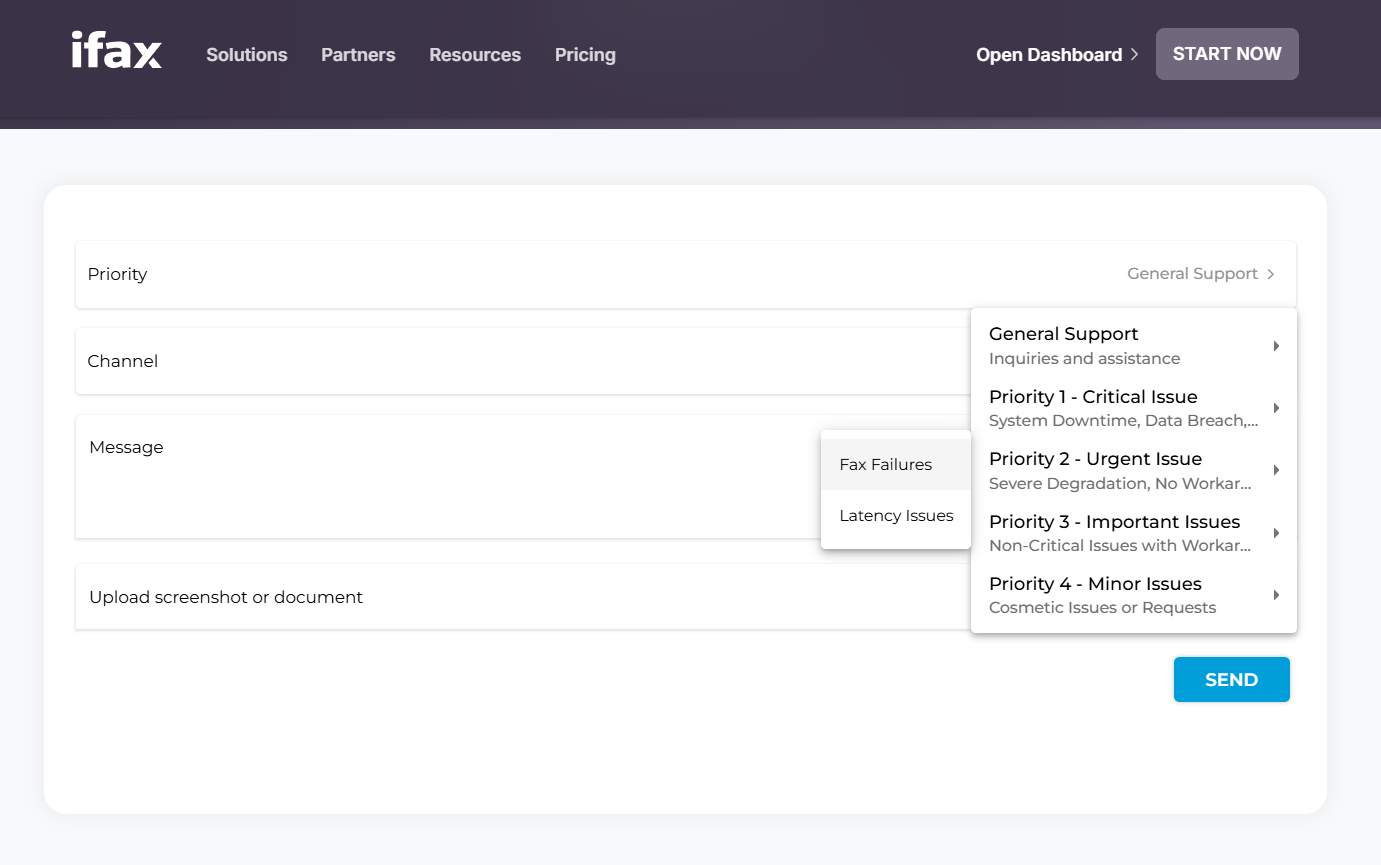
Please fill in the Priority and Channel, such as General Support and Send Email. In the message, include:

  • Your account email and company name.
  • The fax number and the recipient’s or sender’s number.
  • The date, time, and time zone of the fax (if applicable).
  • The exact error or status shown, and what you already tried.
Kent CaƱas

Kent is a content strategist currently specializing in HIPAA-compliant online fax. Her expertise in this field allows her to provide valuable insights to clients seeking a secure and efficient online fax solution.

More great articles
Is iFax Free?

iFax is a subscription-based online fax platform for businesses and organizations that need reliable...

Read Story
Is iFax HIPAA Compliant?

Yes, iFax supports HIPAA-compliant faxing for healthcare providers. Hospitals, clinics, and other ca...

Read Story
Is iFax a Good Fit for Medical and Legal Offices?

Yes. iFax is a secure and scalable online fax platform suitable for medical and legal...

Read Story
Subscribe to iFax Newsletter
Get great content to your inbox every week. No spam.

    Only great content, we don’t share your email with third parties.
    Arrow-up