Quick Answer: To get an online fax number, sign up for a service like iFax, choose a local, toll-free, or international number, and activate it instantly. Having one lets you send and receive faxes using your computer or phone within minutes. There’s no phone line needed.
How fast can I set up an online fax number?
The average time to set it up is under 5 minutes. After creating an account with a provider like iFax, you select a fax number, verify your account, and you’re ready to send or receive faxes immediately. You can get started without installing anything, waiting for a technician, or activating a physical landline.
On This Page
What Is an Online Fax Number?
An online or virtual fax number is a number used for faxing that isn’t tied to a physical phone line or fax machine. It looks exactly like a regular fax or phone number (there’s no special prefix or code that marks it as “online”).
It follows standard numbering formats, which typically means:
- A 10-digit local number in the format (XXX) XXX-XXXX, where the area code (XXX) matches a specific area, city, or region
- A toll-free number using a recognized prefix such as 888, 800, 877, 866, 855, 844, or 833
- An international number, formatted according to the country you’re operating in (if your provider supports numbers outside the US)
Because the number itself follows standard formatting rules, anyone sending you a fax dials it exactly as they would a traditional fax line. The difference lies entirely on the receiving end, where the fax is routed over the Internet rather than over a phone line.
Online fax numbers generally come in three types:
- Local — tied to a specific area code, useful for businesses that want a local presence.
- Toll-free — lets contacts reach your business for free, common for customer-facing businesses.
- Ported numbers — your existing fax number, transferred over to an online fax number service, so you can keep it while moving away from a physical line.
How to Get an Online Fax Number Using iFax
Here’s a step-by-step walkthrough on how to get an online fax number and set it up using iFax.
Step 1 — Choose Your iFax Plan
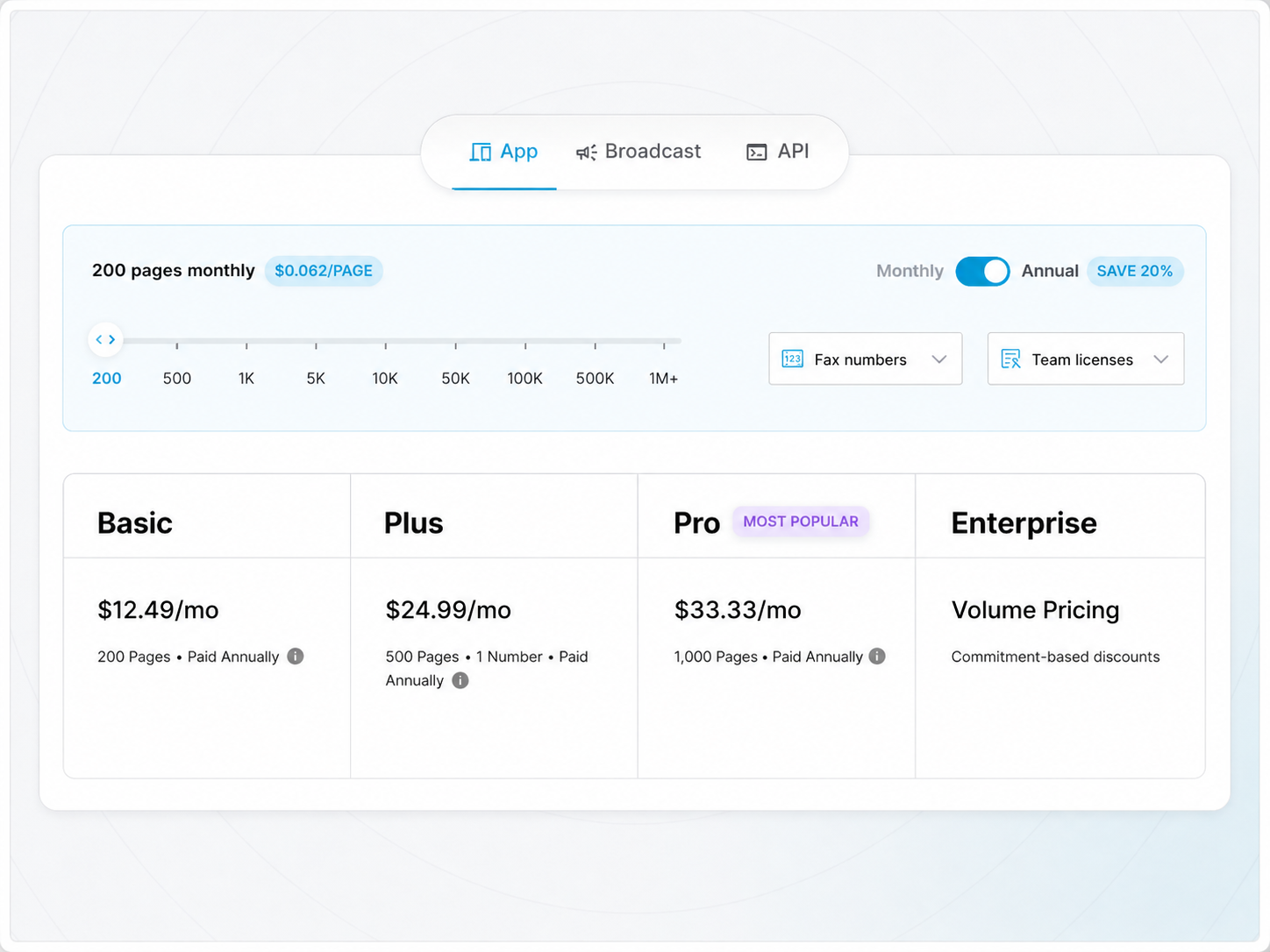
iFax offers its plans in tiers, and it’s worth understanding what each one includes before you sign up, since not every plan comes with a dedicated fax number (more on that below).
- Basic — designed for occasional faxing; send-only, with no dedicated inbound fax number
- Plus — ideal for professionals and businesses; includes a dedicated fax number so you can both send and receive
- Professional — built for teams and higher-volume users; supports multiple fax numbers on one account
Note that pricing and exact page allowances can change, so it’s a good idea to check the current iFax pricing before subscribing.
Step 2 — Sign Up and Create an iFax Account
Once you’ve picked a plan, create your iFax account using your email address. During signup, you’ll typically be asked to set up your account settings and preferences.
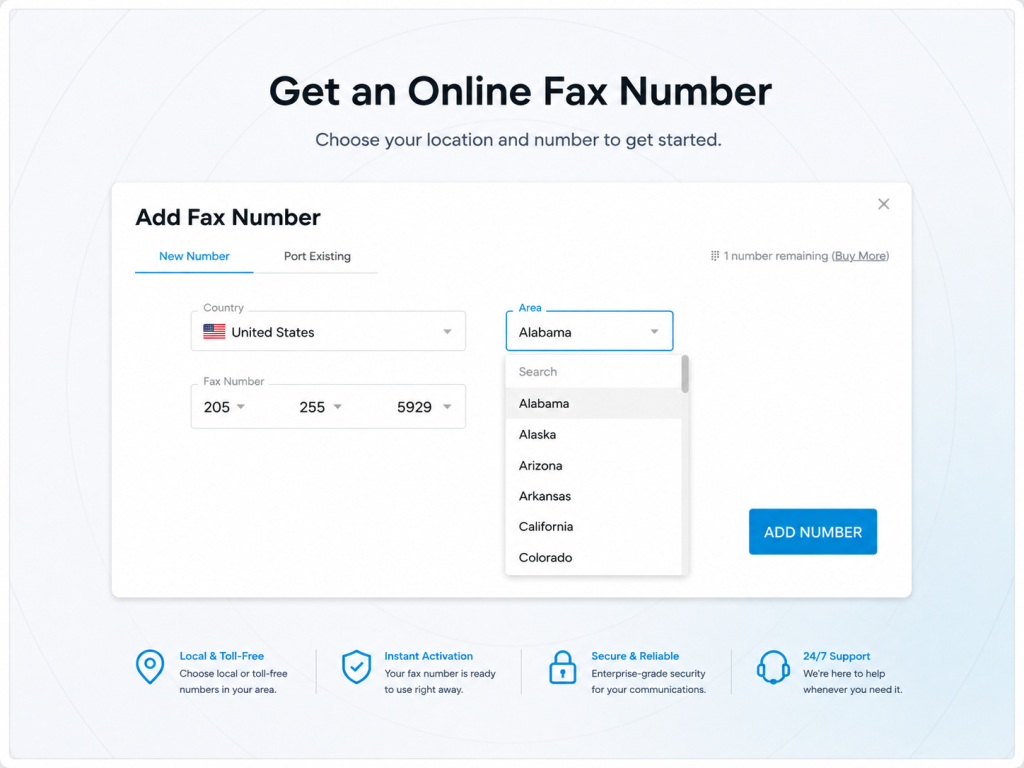
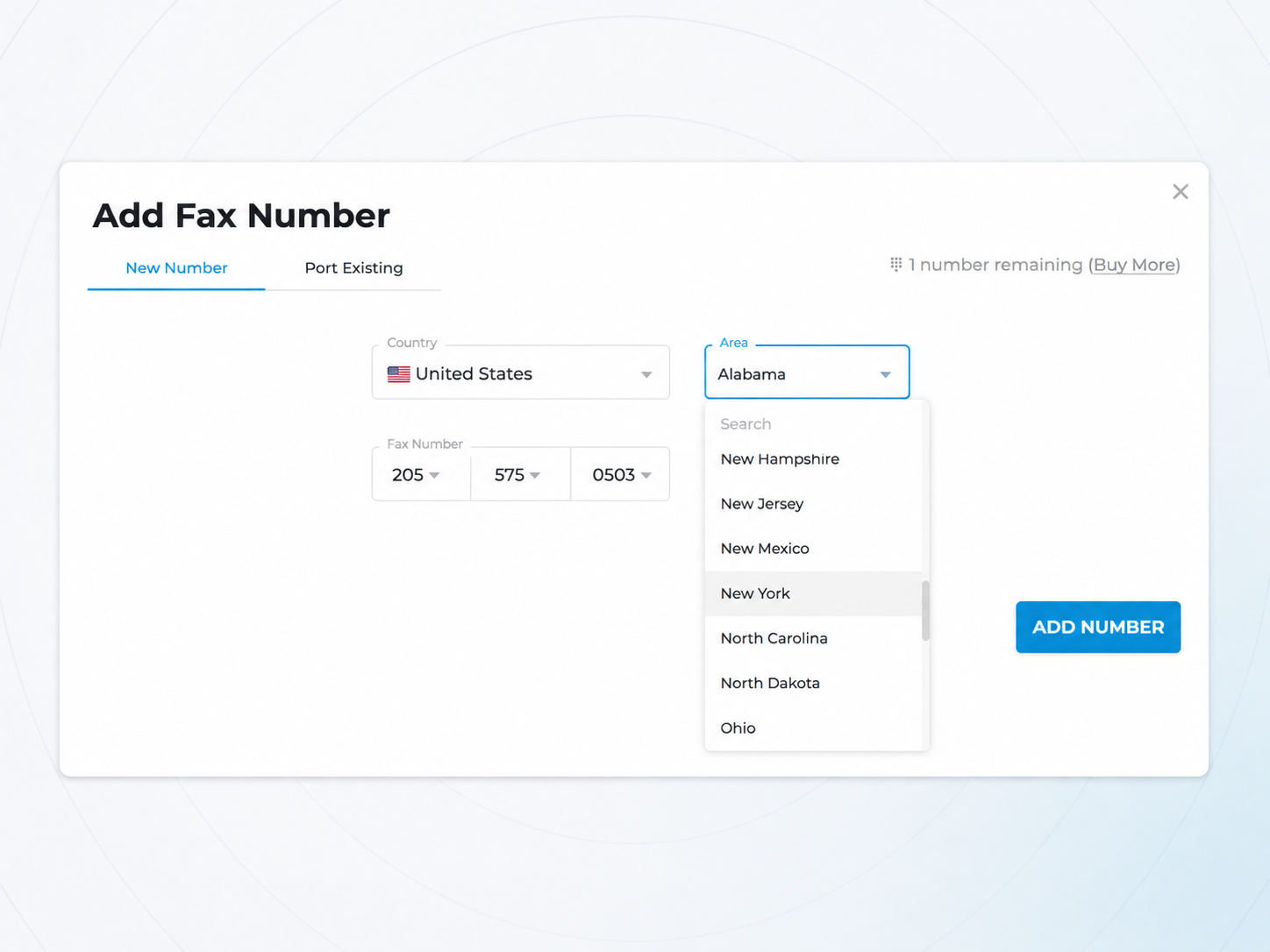
Step 3 — Set Up Your Online Fax Number
This is the core step in getting an online number that you can use for faxing. iFax lets you:
- Pick a local number tied to your country-specific area code
- Port an existing fax number if you already have one and want to move it to iFax’s cloud-based service instead of a physical line
Tip: If you’re setting up an online fax number for the first time, a local number is usually the simplest and fastest option. If you’re replacing an existing fax line, porting lets you keep continuity with contacts who already have your number saved.
Step 4 — Verify and Activate the Number
After selecting your number, iFax activates it instantly. You can configure it immediately or set its configuration settings, such as team access and fax forwarding, at a later time.
Depending on your plan and whether you’re porting a number, you may also be asked to confirm ownership or complete a short verification step before the number goes fully live.
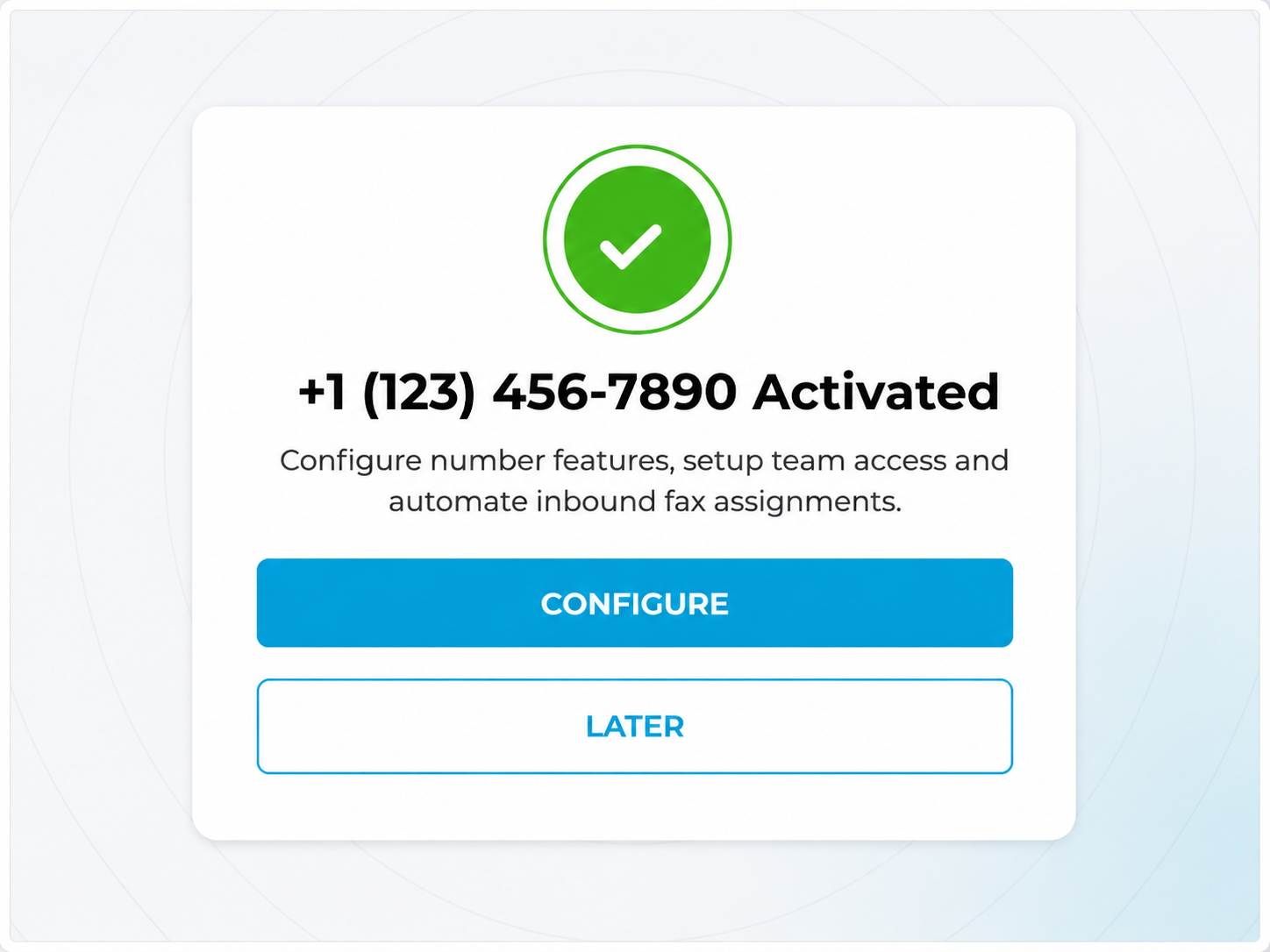
Step 5 — Configure Your Online Fax Number
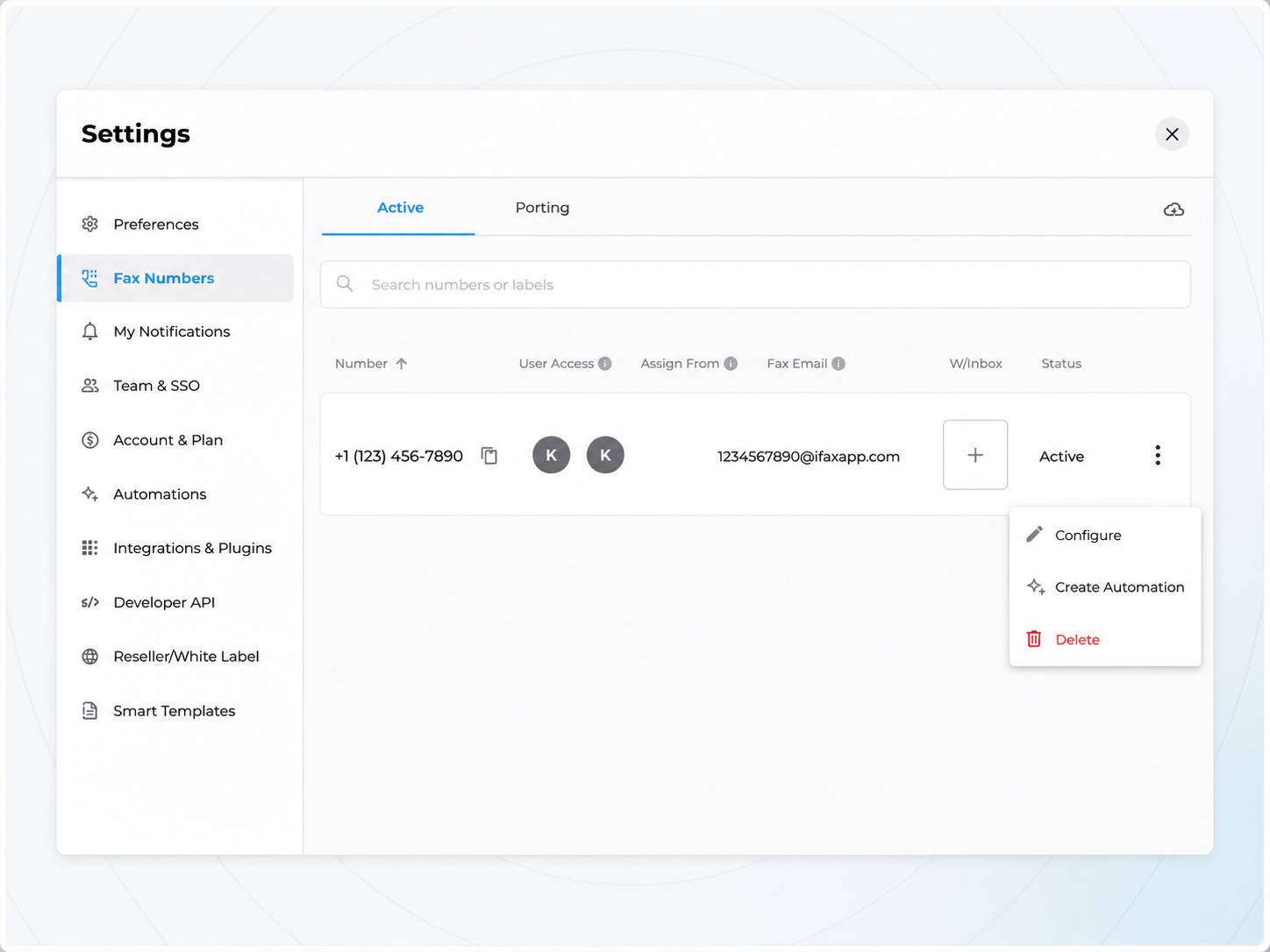
With your number active, take a few minutes to configure it:
- Install the iFax app (iOS, Android, or desktop) or use the web dashboard
- Label your number, assign a fax forwarding email address, and update your team access preferences
- If needed, you can also create an automation specifically assigned to this number
This is also the point where you’d configure any advanced team access or compliance settings if you’re using iFax for business and healthcare faxing purposes.
Step 6 — Test If Your Number is Working
Once everything is set up, send a test fax to confirm it’s working.
Received faxes will appear as digital files in your iFax dashboard inbox, linked email, or in your mobile or desktop app. From here, your online fax number functions just like a traditional one, except there’s no machine, no paper, and no wired landline involved.
Why Get an Online Fax Number? Key Benefits
For businesses and enterprise teams, getting an online fax number solves problems that go well beyond convenience. It’s often about compliance, scalability, and keeping document workflows secure as an organization grows:
No hardware to manage across locations
Enterprises with multiple offices or remote teams don’t need to provision a fax machine and phone line at every site. One online fax number service can support the entire organization from the cloud.
Compliance-ready by design
Industries like healthcare, legal, financial services, and insurance depend on fax for regulated document exchange. Providers built for business, like iFax, support HIPAA and similar compliance requirements so sensitive records are transmitted securely, something a shared office fax machine can’t guarantee.
Faster provisioning, faster onboarding
A traditional fax line can take days to install through a carrier. An online or virtual fax number can be issued and active in minutes, which matters when you’re standing up a new department, office, or acquisition on a deadline.
Centralized oversight and audit trails
Team-based plans let administrators manage users, monitor fax activity, and maintain records from a single dashboard. These options are useful for compliance audits, access control, and accountability across departments.
Built for distributed and hybrid teams
As more organizations operate without a shared physical office, an online fax number keeps fax-dependent workflows (i.e., contracts, referrals, filings, approvals) running without requiring anyone to have physical access to a machine.
In short, for a growing business, an online fax number isn’t just a way to avoid buying a machine. It’s a way to standardize a compliance-sensitive workflow across all employees, offices, and devices without adding IT overhead.
Online Fax Number Use Cases
An online fax number service isn’t just for legacy industries still tied to fax requirements. It fits a range of everyday needs:
- Healthcare providers — HIPAA-compliant faxing for referrals, records, and prescriptions
- Law firms — secure, time-stamped document exchange for filings and contracts
- Real estate agents — fast turnaround on signed offers, disclosures, and closing documents
- Remote and hybrid teams — a shared fax number without a shared physical office
- Professional use — sending or receiving the occasional document without buying a machine
Common Mistakes When Setting Up an Online Fax Number
- Choosing the wrong number type. A toll-free number makes sense for customer-facing businesses, but a local number is often simpler (and cheaper) for small teams or internal use.
- Not checking compliance needs upfront. If you handle healthcare or legal documents, confirm first that HIPAA compliance is included in your plan before you sign up, not after.
- Skipping research on number porting. If you want to keep an existing fax number, check your provider’s porting process and timeline before canceling your old line. Losing continuity with contacts can be a hassle to fix later.
Frequently Asked Questions
How much does it cost to get an online fax number?
Pricing varies by provider and plan. With iFax, its Basic plan is for send-only, while plans that include a dedicated fax number (Plus and above) cost more but add receiving capability and higher page allowances.
Check iFax’s current pricing page for up-to-date rates.
Do I need a phone line for an online fax number?
No, you don’t need a phone line. Online fax services like iFax route faxes entirely through the Internet. This means you can fax directly from a computer, phone, or app without needing a landline, phone jack, or physical fax machine.
Can I use my existing fax number with iFax?
Yes. iFax supports porting an existing fax number onto its platform, so you can move away from a physical line without losing the number your contacts already have saved.
Your Fax Number, Without the Fax Machine
Getting an online fax number doesn’t require a machine, a phone line, or a multi-day setup process. With a provider like iFax, you can go from signing up to sending your first fax in minutes. All from the convenience of your computer or phone, wherever you happen to be working.