A fax campaign setup involves five key steps. From creating a recipient list and uploading the fax document to adding personalization fields, previewing the campaign, and launching the broadcast. These steps enable faxing to a large list of contacts at once while maintaining delivery accuracy.
This guide walks you through every step of setting up your first campaign. Whether you’re reaching clients, partners, or internal teams, a well-organized fax broadcast saves time and maximizes engagement.
5 Steps to Set Up a Broadcast Fax Campaign
Below is the typical campaign setup workflow businesses follow:
Preparing Your First Broadcast Campaign
Preparation is key to achieving the best campaign results. A successful fax broadcast campaign starts with:
- Defining your campaign objectives
- Identifying the right audience
- Preparing documents for bulk distribution
Setting up a solid foundation helps avoid the usual broadcast fax pitfalls, such as compliance issues, low engagement, or wasted resources.
How to Set up and Launch a Fax Campaign
First, choose a secure and reliable platform that makes launching fax broadcast campaigns effortless. iFax is a top choice, with intuitive, AI-enhanced workflows that simplify every step of your online fax campaign setup.
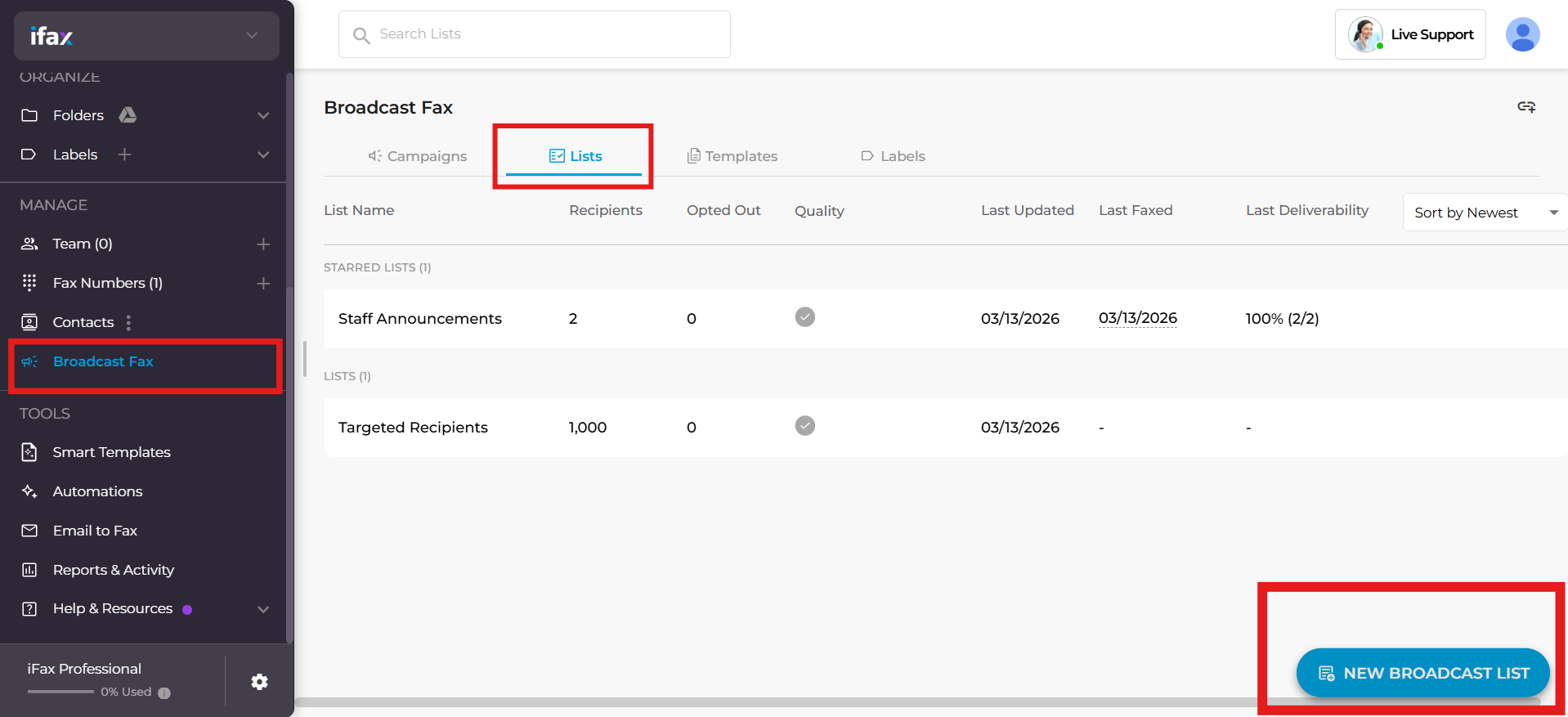
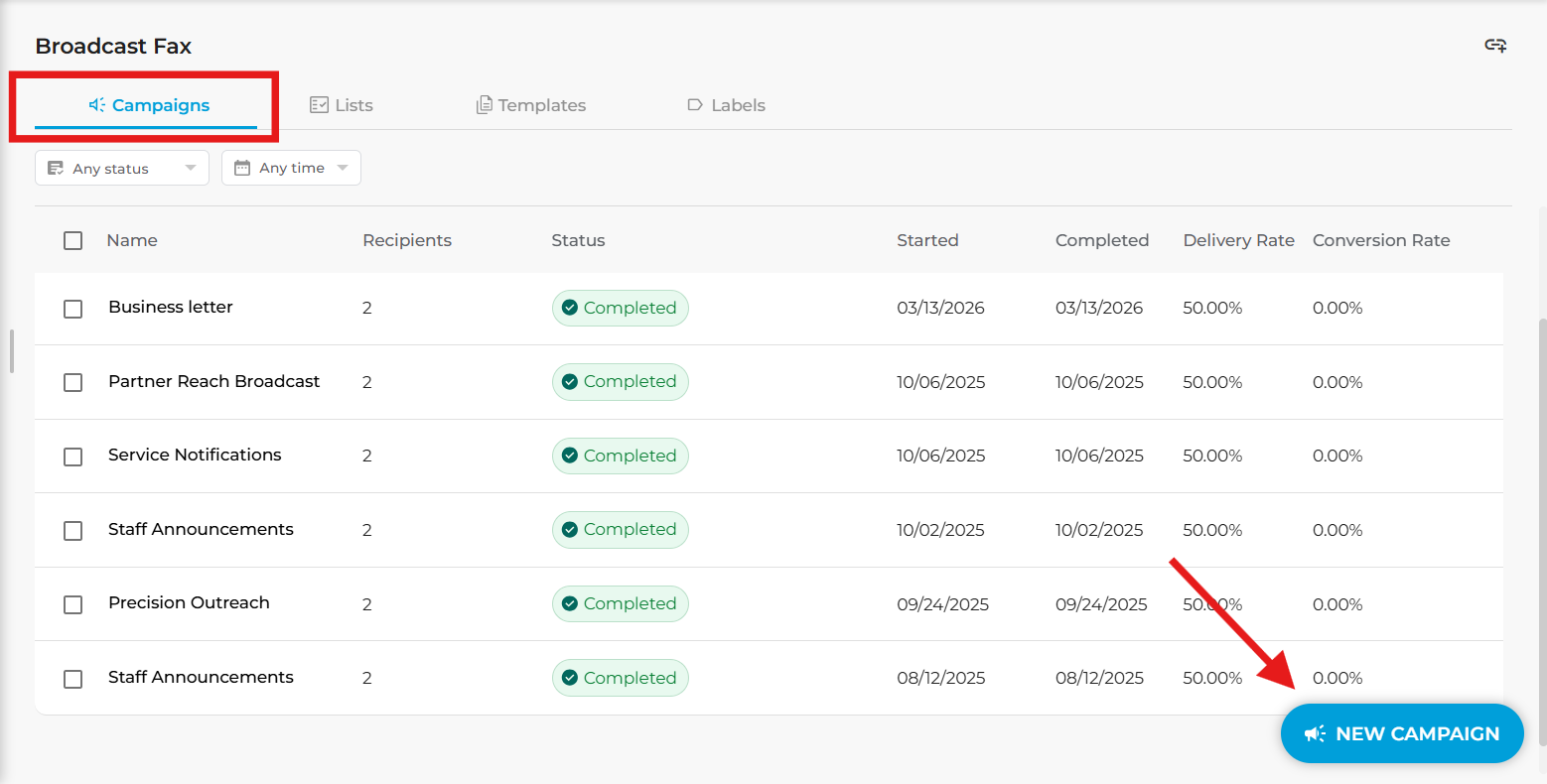
Right after signing up, our platform welcomes you with a modern and intuitive fax dashboard. On its left panel, go to manage, select “Broadcast Fax”, then follow these steps:
Step 1: Create or upload a broadcast list
A broadcast fax list organizes contacts into groups for targeted campaigns. To set up your list in iFax:
- Go to the Lists tab in the broadcast dashboard.
- Click New Broadcast List.
- Bulk upload contacts via CSV or add recipient lists manually.
- Save the list for future campaigns.
You can save multiple lists and mark priority ones as Starred for faster access.
Step 2: Upload the fax document or campaign template
Once your lists are ready, upload the document or template you want to use for fax marketing campaigns.
- In the Campaigns tab, click New Campaign.
- Select the recipient list you created.
- Upload your document or scan the QR code to add your file.
Pro Tip: Use reusable, fax-ready Smart Templates with auto-filled fields for faster, error-free, professional broadcast campaigns.
Step 3: Broadcast fax personalization using mail merge fields
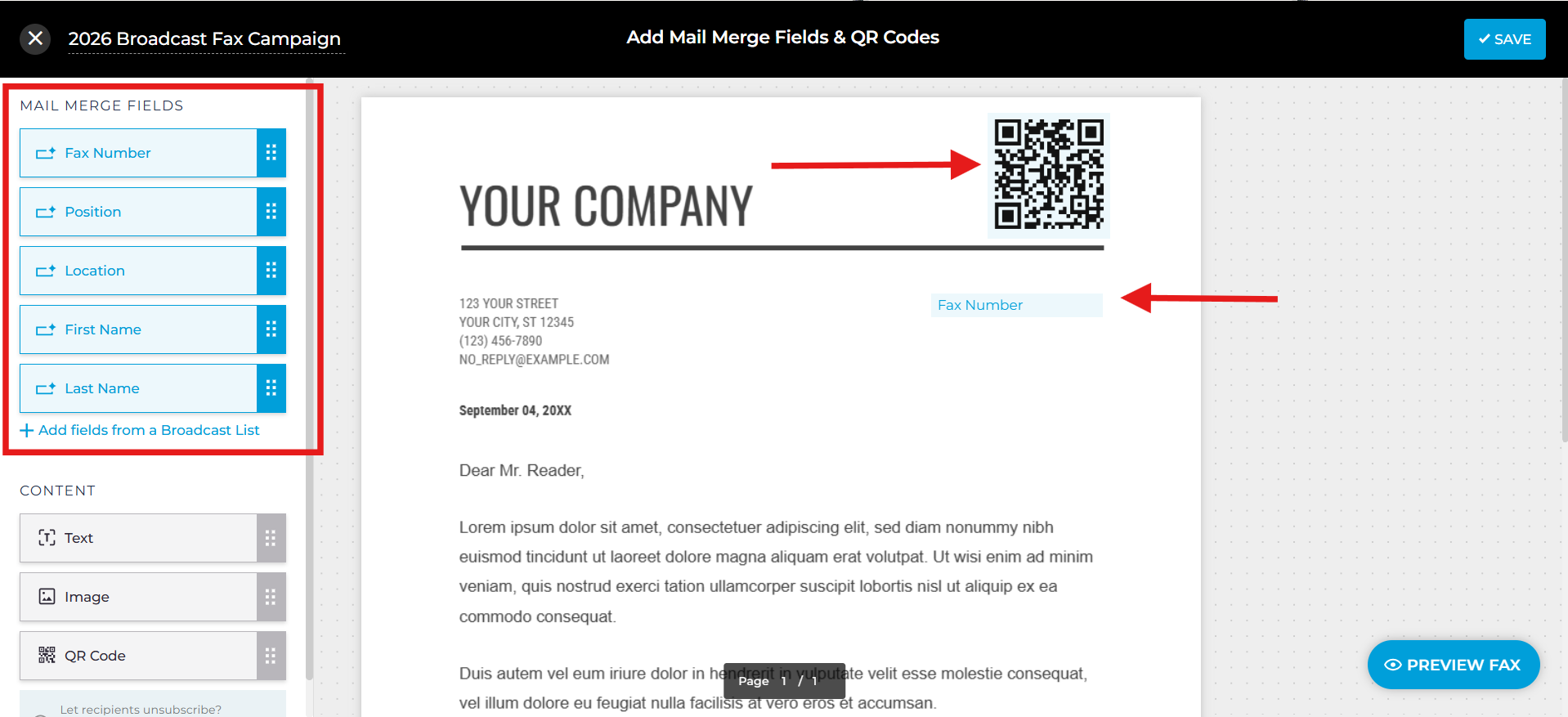
Increase engagement by personalizing your broadcast faxes. Add mail merge fields such as:
- Fax number
- First Name
- Last Name
- Company position
You can also add custom fields for text, images, and QR codes that point to specified opt-out URLs, helping optimize conversions.
Personalized campaigns feel more relevant and are more likely to be noticed and acted upon.
Step 4: Preview the campaign
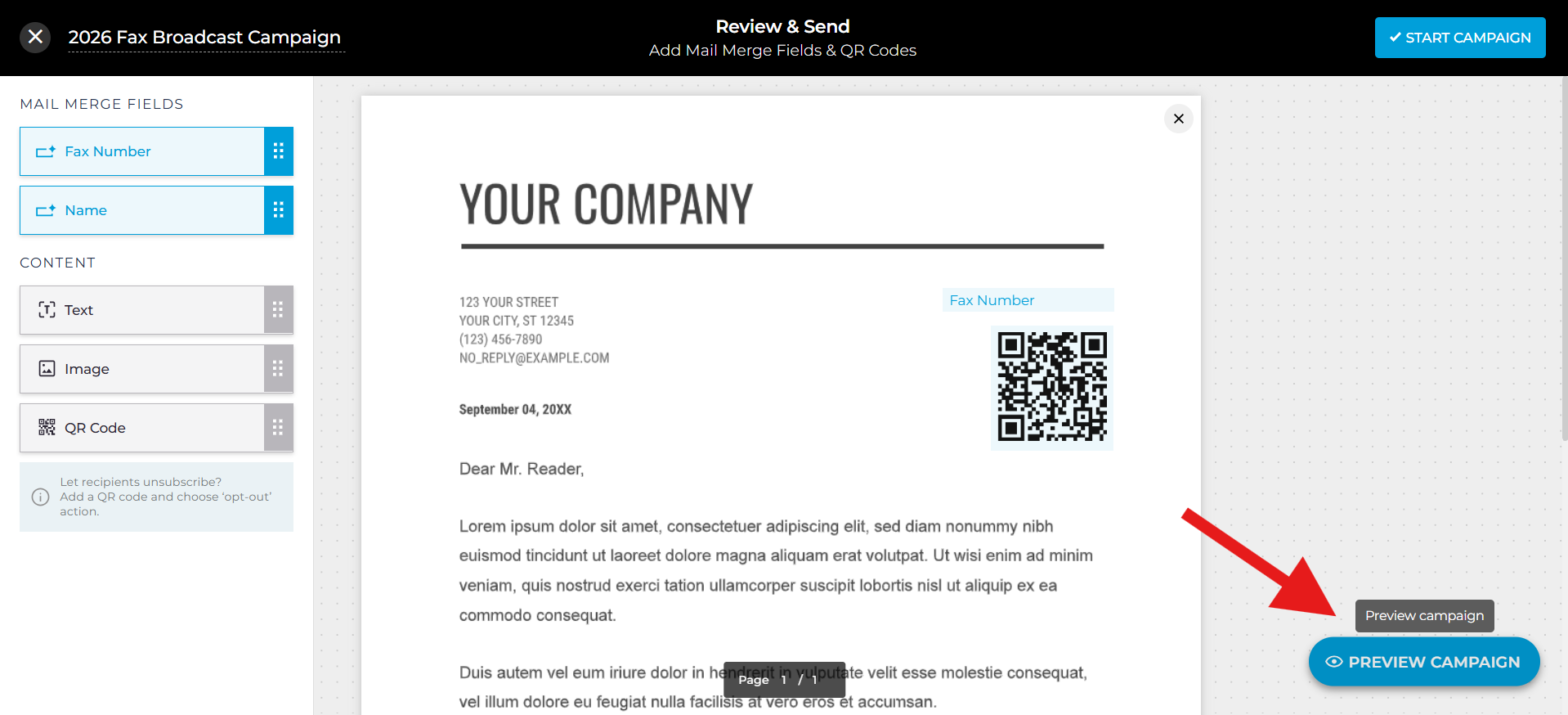
Before sending, preview your fax to ensure:
- Correct formatting
- Properly populated mail merge fields
- Custom text, images, QR codes, and links work as intended
Previewing prevents errors and ensures proper broadcast fax workflow and setup.
Step 5: Launch the fax broadcast
Once everything is ready:
- Click Start Campaign.
- Acknowledge the compliance verification step by clicking Accept.
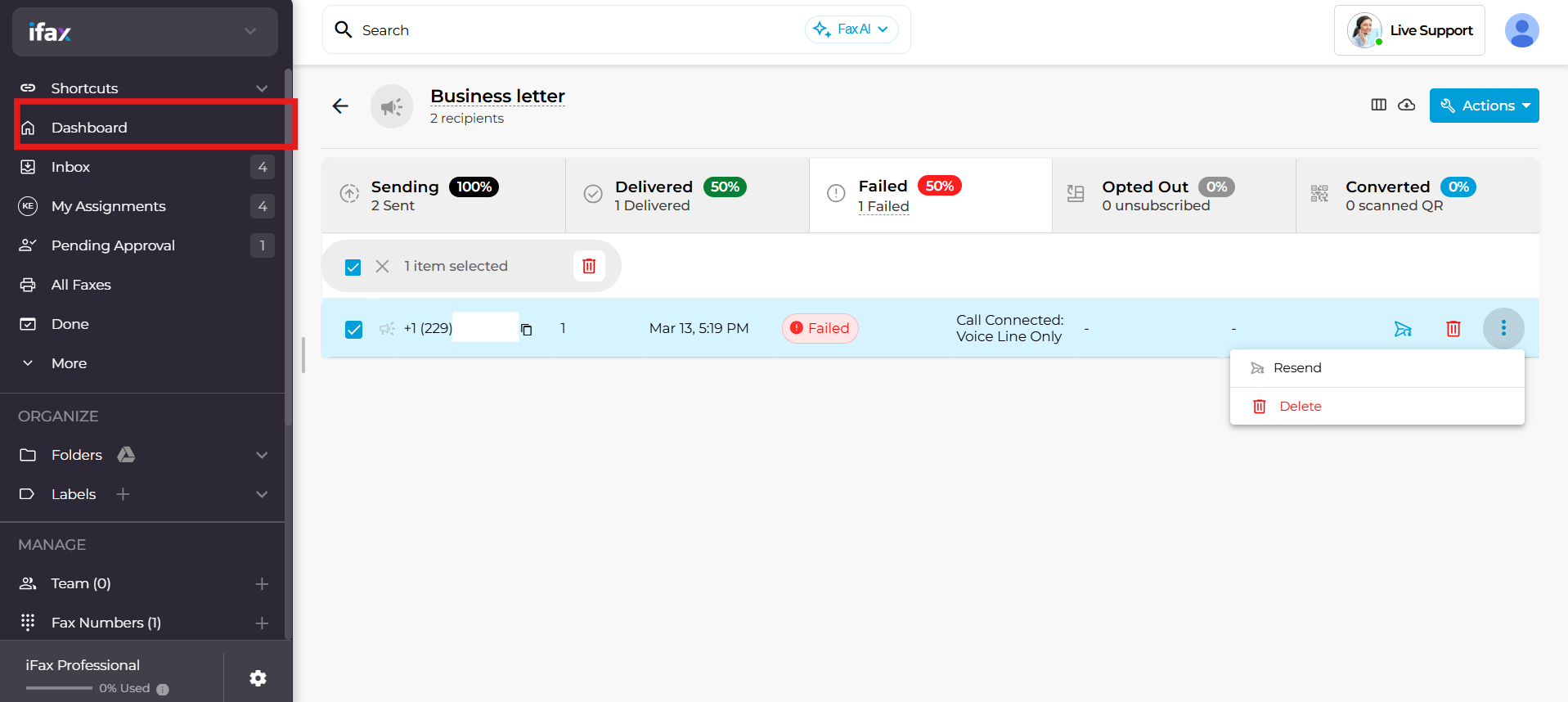
- Monitor your campaign’s status on the dashboard, track delivery reports, view fax opt-outs, view conversions, and resend any failed faxes with a single click.
iFax will notify you when the campaign is activated. You can also schedule fax broadcast delivery during optimal business hours.
Creating Reusable Fax Campaign Templates
Templates save time and effort for repeated campaigns. These are pre-formatted faxes with auto-filled fields for recipient names, fax numbers, addresses, and other details.
To create a template:
- Go to Templates → New Template.
- Upload your document.
- Add mail merge fields, images, QR codes, or custom text fields.
- Preview and save.
Templates let you launch new campaigns without re-uploading documents every time.
Sending broadcast fax templates for fax approval
Fax approvals guarantee accurate, error-free campaigns that align with defined marketing objectives. Teams can submit broadcast fax templates for review. The designated campaign managers or reviewers then provide final approval before distribution.
Campaigns only go live after designated managers approve, preventing costly mistakes and ensuring compliance.
See: Fax Approval for Reviewing and Approving Outgoing Faxes
Best Practices for Successful Fax Campaigns
Running a broadcast fax campaign goes beyond simply sending documents to an extensive recipient list. Following best practices helps your business save time, reduce errors, and maximize the value of your broadcast faxing efforts.
Proven best practices to consider:
- Keep your contact lists updated: Remove outdated fax numbers and verify opt-in statuses to maintain compliance and improve deliverability.
- Audience segmentation: Group recipients based on demographics, engagement history, compliance status, or faxing needs. Dividing your fax broadcast lists into smaller groups helps improve engagement and compliance with applicable regulations.
- Personalize broadcast fax messages: Add mail merge fields such as recipient names and company to make each fax more relevant and engaging.
- Use the Scheduled Send feature: iFax lets you schedule faxes in advance, choose the exact delivery time, and ensure they reach recipients at the most optimal time.
- Monitor results and adjust: Track broadcast fax delivery reports, response rates, and compliance checks to refine future campaigns.
Fax Campaign Setup FAQs
Are iFax’s fax broadcasting features compliant?
Yes. Proper opt-in management and compliance practices ensure broadcast fax campaigns meet TCPA, HIPAA, GLBA, and GDPR requirements.
How long does it take to set up a fax campaign?
With iFax, most users complete setup and launch in under 10 minutes. Once you have your fax list and documents ready, it’s just a matter of uploading, personalizing, previewing, and sending your campaign.
Can I automate fax broadcasting for my business communication needs?
Yes. Fax broadcast solutions like iFax let you schedule broadcast faxes, reuse templates, and automatically insert recipient-specific details. Its automation features let you seamlessly integrate fax broadcasting into your business communication routine.
Start Your First Fax Campaign
Why let time-consuming campaign setups slow down your business communication?
With iFax, setting up your first broadcast fax campaign is as easy as following a few steps.
Launch campaigns that are:
- Fully automated: Schedule deliveries and reuse fax-ready templates for consistent outreach
- Highly personalized: Add mail merge fields, QR codes, and images for maximum engagement
Legally compliant: Meet HIPAA, TCPA, and GDPR standards - Cross-Platform Control: Effortless broadcast fax management from anywhere
See how easy, secure, and compliant fax broadcast campaigns can be. Request your free demo and take your first step toward smarter fax broadcasting.