A practical walkthrough for developers integrating HIPAA-compliant fax into clinical software.
If you’re building a healthcare application and wondering how to set up cloud fax API functionality, the short answer is: pick a HIPAA-compliant fax API provider, sign a BAA, provision a fax number, authenticate with an API key, and start sending faxes via REST.
A cloud-based fax API integration replaces analog hardware with programmable HTTP endpoints. Same compliance posture, far better developer experience.
On This Page
1. Choose a HIPAA-Compliant Fax API Provider
Before writing a line of integration code, your provider selection determines your compliance ceiling. A HIPAA Fax API isn’t just secure. It comes with contractual and technical requirements:
Signed Business Associate Agreement
If a provider handles PHI for your organization, HIPAA classifies it as a Business Associate. Treat a missing BAA as a major compliance red flag.
Full-layer encryption
TLS 1.2+ for all API calls; AES-256 for stored fax data and metadata.
Detailed audit logging
Each transmission generates a log of the sender, recipient, timestamp, status, and page count to satisfy HIPAA’s audit control requirements.
Fax number provisioning
The ability to assign dedicated inbound numbers per department or team, with webhook-based routing.
Developer documentation
Sandbox environment, OpenAPI specification, multiple language examples, and transparent rate limits.
iFax is purpose-built for this use case. Its HIPAA-compliant cloud fax API includes BAA support, AES-256 encryption, a free API test key, and developer documentation.
2. Get An API Key and Configure Your Environment
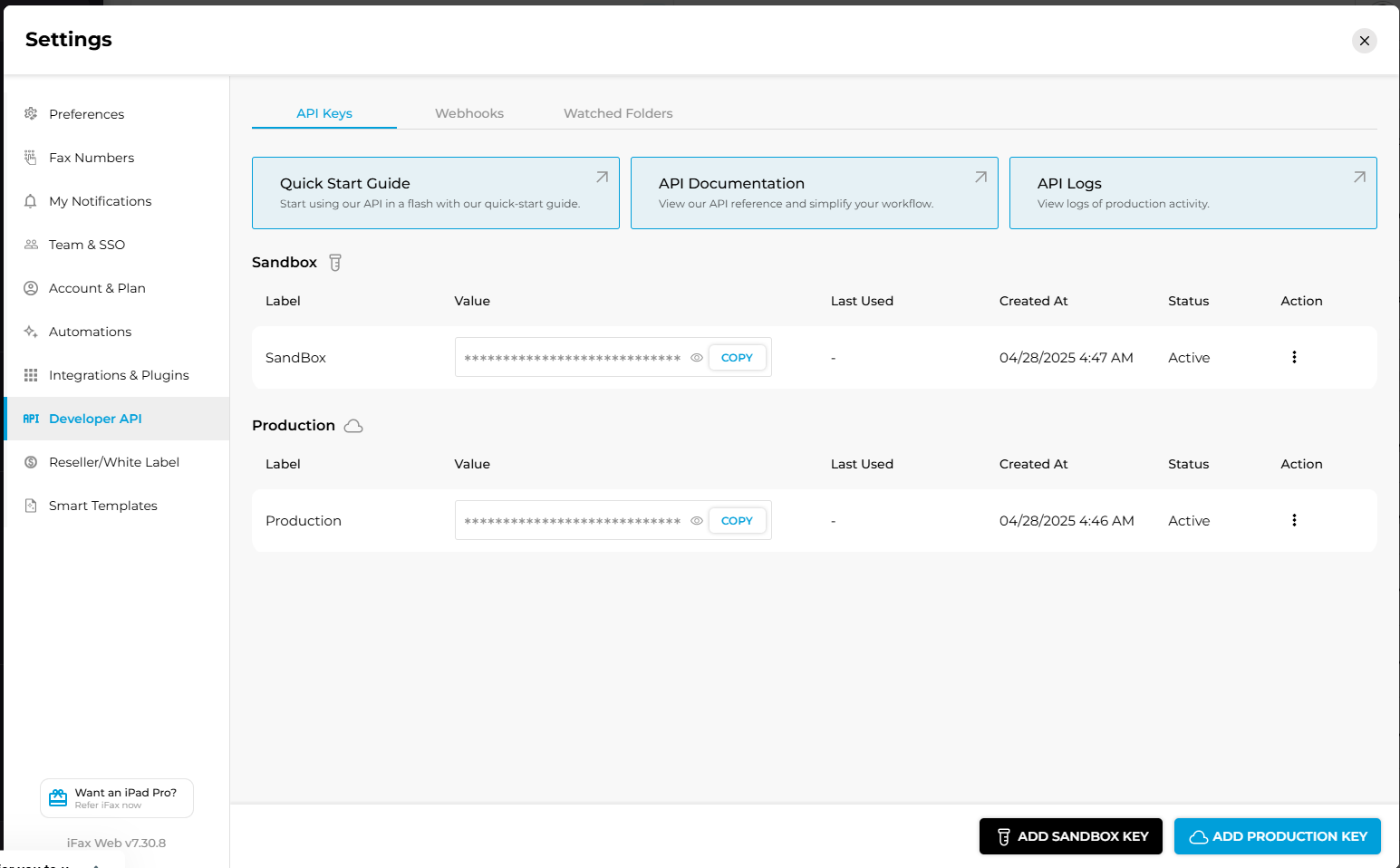
The first technical step to this cloud-based fax API integration guide is obtaining credentials. For iFax, log in to your account, then go to Settings > Developer API > Add Production API Key. Copy the key and store it immediately.
✅ Treat API keys like database passwords. Store them in a secrets manager (e.g., AWS Secrets Manager) or environment variables. Never hardcode or commit them to source control.
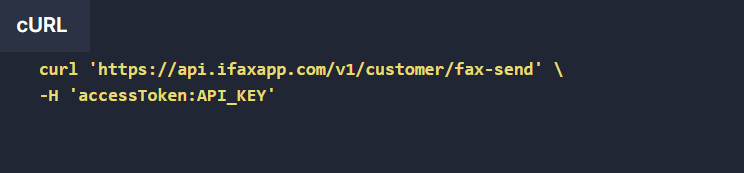
Set up a reusable authenticated client in your language of choice:
3. Send Your First Healthcare Fax
The core of any cloud fax API setup for a healthcare application: a POST request with the recipient fax number and the document. Always use PDF for clinical documents as it preserves formatting.
curl https://api.ifaxapp.com/v1/customer/inbound/fax-list \
-H 'accessToken: YOUR_API_KEY' \
-d '{
    "numberId": "123465",
    "orderId": "123465",
    "markedAs": "Done",
    "startDate": "05/03/2024"
    "endDate": "10/03/2024"
}
require 'rest-client'
    require 'json'
    def create_fax
        begin
            url = 'https://api.ifaxapp.com/v1/customer/inbound/fax-list'
            data = {
                numberId: '123456',
                orderId: '123456',
                markedAs: 'Done',
                startDate: '05/03/2024',
                endDate: '10/03/2024'
            }
            headers = {
                ''Content-Type' => ''application/json',
                ''Accept' => ''application/json',
                ''accessToken' => ''YOUR_API_KEY'
            }
            response = RestClient.post(url, data.to_json, headers)
            puts "Response Code: #{response.code}"
            puts "Response Body: #{response.body}"
            return response.body
        rescue RestClient::ExceptionWithResponse => e
            return { error: e.response.body }
        end
    end
    create_fax
const axios = const require("axios");

exports.createFax = async ()= > {
    try {
        data = {
            numberId: "123456",
            orderId: "123456",
            markedAs: "Done",
            startDate: "05/03/2024",
            endDate: "10/03/2024"
        }
        let result = await axios.post(
            `https://api.ifaxapp.com/v1/customer/inbound/fax-list`, data, {
            headers: {
                "Content-Type": "application/json",
                "Accept": "application/json",
                "AccessToken": "YOUR_API_KEY"
            },
        })
        return result
    } catch (error) {
        return { error }
    }
}
import java.io.OutputStream;
import java.net.HttpURLConnection;
import java.net.URL;
import org.json.JSONArray;
import org.json.JSONObject;

public class FaxSender {
    public static void createFax() {
        try {
            String url = "https://api.ifaxapp.com/v1/customer/inbound/fax-list";
            URL obj = new URL(url);
            HttpURLConnection con = (HttpURLConnection)
                obj.openConnection();
            // Set request method and headers
            con.setRequestMethod("POST");
            con.setRequestProperty("Content-Type", "application/json");
            con.setRequestProperty("Accept", "application/json");
            con.setRequestProperty("accessToken", "YOUR_API_KEY");
            con.setDoOutput(true);

            // Prepare JSON data
            JSONObject json = new JSONObject();
            json.put("numberId", "123465");
            json.put("orderId", "123465");
            json.put("markedAs", "Done");
            json.put("startDate", "05/03/2024");
            json.put("endDate", "10/03/2024");

            // Write data to request body
            try (OutputStream os = con.getOutputStream()) {
                os.write(json.toString().getBytes("UTF-8"));
                os.flush();
            }

            // Get response
            int responseCode = con.getResponseCode();
            System.out.println("Response Code: " + responseCode);
            try (java.util.Scanner scanner =
            new java.util.Scanner(con.getInputStream())) {
                String responseBody = scanner.useDelimiter("\\A").next();
                System.out.println("Response Body: " + responseBody);
            }
        } catch (Exception e) {
            e.printStackTrace();
        }
    }

    public static void main(String[] args) {
        createFax();
    }
}
function createFax() {
    try {
        $url = 'https://api.ifaxapp.com/v1/customer/inbound/fax-list';
        $data = [
            'numberId' => '123456',
            'orderId' => '123456',
            'markedAs' => 'Done',
            'startDate' => '05/03/2024',
            'endDate' => '10/03/2024'
        ];
        $headers = [
            'Content-Type: application/json',
            'Accept: application/json',
            'accessToken: YOUR_API_KEY'
        ];
        $ch = curl_init($url);
        // Set cURL options
        curl_setopt($ch, CURLOPT_RETURNTRANSFER, true);
        curl_setopt($ch, CURLOPT_POST, true);
        curl_setopt($ch, CURLOPT_POSTFIELDS, json_encode($data));
        curl_setopt($ch, CURLOPT_HTTPHEADER, $headers);
        $response = curl_exec($ch);
        if (curl_errno($ch)) {
            throw new Exception('Request Error: ' . curl_error($ch));
        }
        $httpCode = curl_getinfo($ch, CURLINFO_HTTP_CODE);
        curl_close($ch);
        echo "Response Code: $httpCode\n";
        echo "Response Body: $response\n";
        return $response;
    } catch (Exception $e) {
        return json_encode(['error' => $e->getMessage()]);
    }
}
createFax();
    import requests
    import json

    def create_fax():
        try:
            url = 'https://api.ifaxapp.com/v1/customer/inbound/fax-list'
            data = {
                "numberId": "123456",
                "orderId": "123456",
                "markedAs": "Done",
                "startDate": "05/03/2024",
                "endDate": "10/03/2024"
            }
            headers = {
                "Content-Type": "application/json",
                "Accept": "application/json",
                "accessToken": "YOUR_API_KEY"
            }
            # Make the POST request
            response =  requests.post(url,
                            data=json.dumps(data),
                            headers=headers
                        )
            # Print response details
            print("Response Code:", response.status_code)
            print("Response Body:", response.text)
            return response.json()
        except requests.exceptions.RequestException as e:
            print(f"Error: {e}")
            return {"error": str(e)}

    # Call the function
    create_fax()
4. Handle Delivery Status with Webhooks
In a clinical workflow, knowing whether an online fax was delivered matters as much as sending it. A failed referral fax is a patient safety issue. Webhooks give you near-real-time delivery events without polling.
Register a webhook endpoint
curl -X POST https://api.ifaxapp.com/v1/webhooks \
  -H 'accessToken: API_KEY' \
  -H "Content-Type: application/json" \
  -d '{"url": "https://your-app.com/webhooks/fax"}'
When a fax status changes, your endpoint receives a payload like this:
					{
	          	   		"jobId": 12345,
	          	   		"fromNumber": "+441224515014",
	          	   		"toNumber": "+15065001844",
	          	   		"faxCallLength": 173,
	          	   		"faxCallStart": 1610966603 (UTC timestamp),
	          	   		"faxCallEnd": 1610966723 (UTC timestamp),
	          	   		"faxTotalPages": 20,
	          	   		"faxTransferredPages": 20,
	          	   		"faxStatus": "delivered",
	          	   		"message": "NORMAL_CLEARING",
	          	   		"code": 0,
	          	   		"direction":"sent"
	          	   	}
ℹ️ Always respond to webhooks with HTTP 200 within 5 seconds. Consider offloading the heavy processing to a job queue (e.g., Bull, Celery) so the webhook handler stays fast.
5. Receive and Store Inbound Faxes
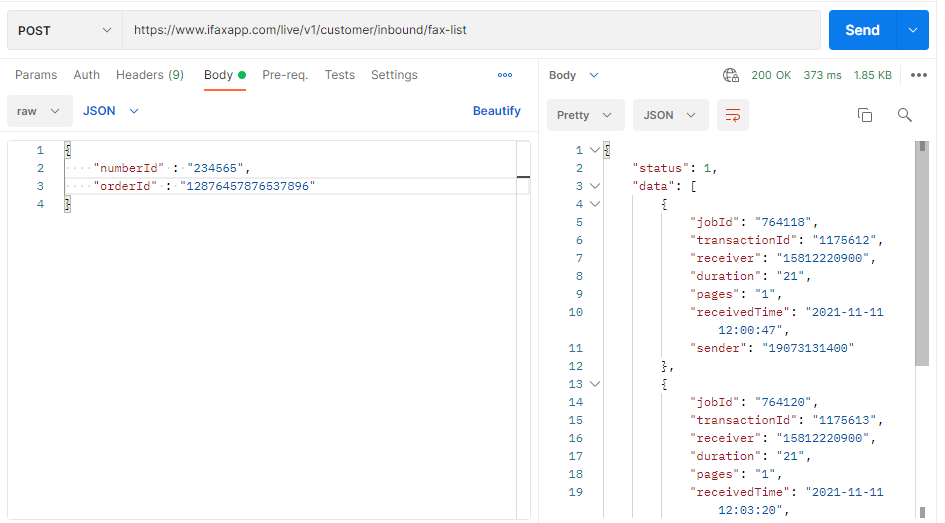
A complete integration must cover both outbound and inbound faxing. Referral responses, insurance approvals, and external lab results all arrive as inbound faxes. The RESTful API posts them to your webhook the moment they land on your provisioned number.
6. Integrate With Your EHR or EMR
How EHR integration works with cloud-based Fax API mainly consists of two most common patterns: sending on document finalization and attaching inbound faxes to patient records.
When a physician finalizes a referral or discharge summary, your EHR system fires a FHIR subscription event. Your integration layer catches it, renders the document as a PDF, and forwards it to the Fax API for transmission. iFax handles the fax delivery.
7. Error Handling and Retry Logic
Transmission can fail for many reasons: busy lines, no-answer timeouts, malformed numbers, and carrier issues. For healthcare fax workflows, silent failures are unacceptable. Build in retry logic from the start.
If a webhook fails, iFax automatically retries up to 5 times with a time-based backoff schedule.
Error message examples
| Error Code | Message | Cause |
| -2075 | INVALID_NUMBER_FORMAT | Recipient fax number is malformed or not in E.164 format. |
| -2074 | User is not authorized to operate actions on specified contact | API key does not have permission to perform the requested action. |
| 120109 | Invalid file format | Uploaded file type is not supported. Use a PDF. |
| 263 | USER_BUSY | The recipient fax line is busy. Retry after a delay. |
| 11013 | Processing error. Please try again later. | Server-side error during fax processing. Retry using exponential backoff. |
8. Review Your HIPAA Compliance Checklist Before Going Live
Before pushing your cloud fax API integration to production, run through a full HIPAA compliance checklist covering technical safeguards, access controls, audit controls, and transmission security requirements.
iFax maintains a detailed checklist built specifically for healthcare developers and covered entities.
Why It Matters
A Fax API that works technically but lacks HIPAA safeguards is a compliance risk. If your application handles ePHI, it should implement appropriate technical safeguards such as access controls, audit logs, integrity protections, and secure transmission. Addressing these requirements before launch is far less expensive than responding to a breach or an OCR investigation.
Disclaimer
This guide is for general reference only and does not constitute legal or compliance advice. Consult a qualified HIPAA compliance officer before deploying any application that handles PHI.
Frequently Asked Questions
How can I integrate a cloud-based fax API into my existing software
Most integrations with existing software follow a familiar pattern: authenticate with an API key, send documents via the API, and receive delivery updates via webhooks. For healthcare applications, it’s crucial to choose a provider that offers a signed BAA, encrypts PHI, and supports audit logging for HIPAA compliance.
Does a cloud fax API require a BAA if I’m only sending clinical documents?
Yes. Any transmission of sensitive protected health information to a third-party service, including a fax API provider, constitutes a disclosure to a Business Associate under HIPAA. The BAA is required regardless of whether you’re sending one fax a day or ten thousand.
What file format should I use for clinical documents?
PDF (ideally PDF/A for archival compliance). Avoid faxing Word documents or images directly, as formatting can degrade when the provider converts them to the T.30 fax protocol. If your source is an EHR export, request PDF output before calling the API.
How do I prevent PHI from appearing in error logs
Never log request or response bodies that may contain confidential health information. Wrap API calls in try/catch blocks, sanitize errors before logging, and record only the information needed for troubleshooting, such as the HTTP status code, error code, and correlation or request ID.
If you’re using Axios, avoid logging properties like error.config.data, which may contain the fax payload.
What happens if my webhook endpoint is down when a fax is delivered?
If your webhook endpoint is unavailable, iFax will automatically retry up to 5 times with the following backoff: 5 minutes, 10 minutes, 20 minutes, 30 minutes, and 60 minutes. To avoid missing status updates, implement a reconciliation job that periodically queries the Fax API for recent fax statuses and compares them with your internal records. Doing so provides a fallback if webhook delivery ultimately fails.

Start Building a Secure Healthcare Fax Integration
Fax isn’t going away in healthcare, but its implementation should reflect modern software development. A well-designed API for healthcare faxing eliminates manual workflows, provides complete delivery visibility, and helps protect PHI throughout every stage of transmission.
This guide outlines the fundamental steps for a successful cloud fax API setup for healthcare application development. It walked through secure authentication, fax provisioning, webhook-based status tracking, and HIPAA compliance. Use this as your starting point and adapt the integration to your technology stack and EHR’s data model. Most importantly, verify compliance with all HIPAA requirements before deployment.
When you’re all set to explore the iFax Programmable API, reach out to our sales team for a personalized demo.